---
description: Is it hard to learn how to set up a laser marking system? Here are some easy-to-follow steps to use the control system software for your laser marking machine.
title: How To Setup A Laser Marking System for Beginners and Pros?
image: https://www.stylecnc.com/uploads/allimg/160502/1462132526443227-lp.jpg
---

# [10 Easy Steps To Using A Laser Marking Machine System](https://www.stylecnc.com/user-manual/Laser-marking-machine-system-setup.html "10 Easy Steps To Using A Laser Marking Machine System")

Last Updated: 2025-01-06 By [Jimmy](https://www.stylecnc.com/author/jimmy "Jimmy")4 Min Read

## How To Setup A Laser Marking System for Beginners and Pros?

Is it hard to learn how to set up a laser marking system? Here are some easy-to-follow steps to help beginners and professionals alike work with the control system software of your laser marking machine.

A correctly installed laser marking machine represents a solid foundation for obtaining high productivity and long service, whatever the application may be, whether it is on an initial installation or merely on a system re-configuration due to a different location in the workspace.

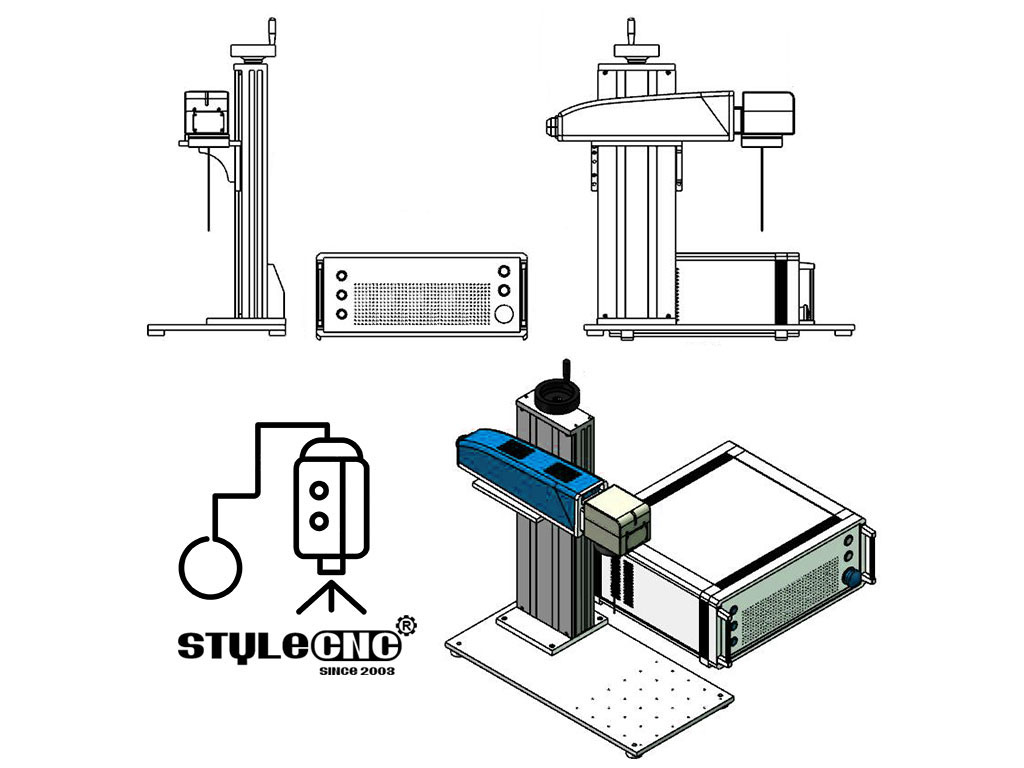
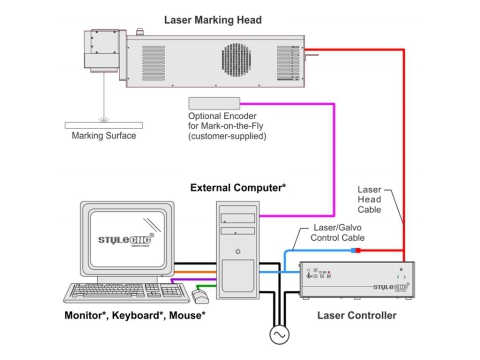
Every laser marking machine will consist of a laser controller, a marking head, a computer system, and the cables that connect them together. Each element must be arranged with care and attached fast for safety and precision of work. Besides proper setting alignment, sufficient ventilation shall also be provided to avoid heating-up and ensure constant quality of the marking.

It would also include cable connections and calibration procedures as per the manufacturer's instructions for installation. A proper setup takes time, but it offers you a long life with a machine that can provide very professional and precise results for your marking projects.

![laser marking machine]()

### Easy-To-Follow Steps

**Do not connect any power cable to power source until all laser marking machine system connections are made.** 

1\. All equipment must remain powered down and in the OFF position until mounting is complete.

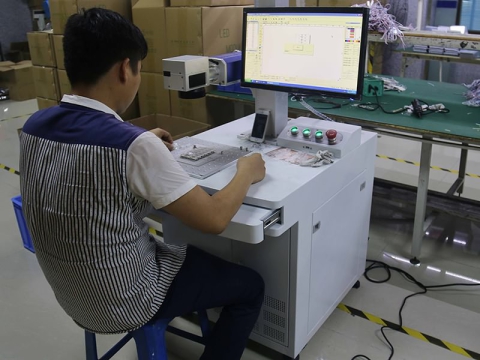
2\. Place the laser controller, system computer, monitor, keyboard, and mouse in the desired locations. Locate the laser controller as close as possible to the laser marking head.

3\. Ensure sufficient clearance exists on all sides of the laser controller to allow for proper air circulation and to permit proper installation of applicable cables. Refer to the Laser Marking Machine Controller Dimensions drawing for details.

4\. Place the laser marking head on a suitable mounting surface.

5\. Ensure sufficient clearance exists on all sides of the laser marking head to allow for proper air circulation and to permit proper installation of applicable cables. Refer to the Laser Marking Head Dimensions drawing for details.

6\. Mount the laser marking head with three M5-0.80 bolts and lock washers using the factory-tapped mounting holes provided. Refer to the laser marking head dimensions drawing for details.

**Note**: Optionally, three M6 locating pins may be used at the 0.2362 P6 hole locations for more precise marking head alignment.

7\. Select the proper fuse arrangement for the laser controller. Refer to the laser marking machine installation and maintenance manual.

8\. Connect all cables as applicable (fiber optic cable, laser marking head cable, RF cable, galvo control cable, computer monitor, keyboard, mouse, and power cables).

9\. Connect any optional or customer-supplied devices or interface circuits as applicable.

10\. Refer to the operation supplement for proper startup procedure. Refer to the laser marking software operating instructions for complete information on using the system software.

**For different type fiber laser marking machine, welcome to click our product here:**

| [](https://www.stylecnc.com/fiber-laser-marking-machine/Desktop-fiber-laser-marking-machine-for-metal-and-non-metal.html "Standard fiber laser marking machine") | [](https://www.stylecnc.com/fiber-laser-marking-machine/3D-laser-marking-machine-with-IPG-fiber-source.html "3D fiber laser marking machine") | [](https://www.stylecnc.com/fiber-laser-marking-machine/online-flying-fiber-laser-marking-machine.html "Flying fiber laser marking machine") | [](https://www.stylecnc.com/fiber-laser-marking-machine/portable-fiber-laser-marking-machine.html "Portable fiber laser marking machine") |
| ---------------------------------------------------------------------------------------------------------------------------------------------------------------- | --------------------------------------------------------------------------------------------------------------------------------------------- | -------------------------------------------------------------------------------------------------------------------------------------------- | ----------------------------------------------------------------------------------------------------------------------------------------- |
| Standard fiber laser marking machine                                                                                                                             | 3D fiber laser marking machine                                                                                                                | Flying fiber laser marking machine                                                                                                           | Portable fiber laser marking machine                                                                                                      |

### Safety Precautions Before Setup

Ensuring safety is paramount when setting up a laser marking machine. Proper precautions help protect the equipment, operator, and workspace while preventing unnecessary hazards. Here are essential safety tips to follow.

• **Power Off the System**: Ensure all equipment remains powered off and disconnected from the power source before starting the setup. This prevents accidental electrical hazards during installation.

• **Wear Appropriate Safety Gear**: Equip yourself with safety goggles designed for laser use and other protective gear as required. This minimizes exposure to harmful laser beams and ensures safe handling.

• **Inspect the Workspace:** Verify that the setup area is clean, dry, and free from flammable materials. Ensure proper ventilation to dissipate heat generated during machine operation.

• **Read the User Manual Thoroughly**: Familiarize yourself with the machine's installation and maintenance guide. Understanding the manufacturer's instructions ensures correct assembly and minimizes risks.

• **Check All Components**: Inspect the laser controller, marking head, and cables for any damage or defects before installation. Damaged components can lead to malfunction or safety hazards.

• **Secure the Equipment**: Ensure that the machine and its components are mounted on stable and suitable surfaces. Proper mounting prevents movement during operation, ensuring both safety and precision.

### Troubleshooting Common Setup Issues

Setting up a laser marking machine can sometimes present unexpected challenges. Knowing how to address common issues ensures a smoother process and prevents unnecessary delays. Here's a guide to troubleshoot the most frequent setup problems effectively:

**Power Supply Problems**

Ensure all power cables are securely connected, and the correct voltage is supplied. Double-check the fuse arrangement in the controller to confirm compatibility with the power source and replace blown fuses if necessary.

**Incorrect Cable Connections**

Verify that all cables, including the fiber optic, galvo control, and monitor connections, are properly installed. Cross-check against the user manual to avoid any mismatched or loose connections that could interrupt the system.

**Poor Air Circulation**

Ensure the laser controller and marking head are positioned with sufficient clearance for airflow. Remove any obstructions near the vents to prevent overheating and ensure consistent performance.

**Misaligned Laser Marking Head**

Check that the marking head is mounted securely using factory-provided mounting holes. Adjust its position if alignment is off and use optional locating pins for more precise placement to improve marking accuracy.

**Software Installation Issues**

Confirm that the laser marking software is installed correctly on the system computer. Restart the software if it fails to respond and reinstall if problems persist to avoid interruptions.

**Device Initialization Errors**

If the machine does not start up properly, refer to the operation supplement for the startup sequence. Inspect all optional or customer-supplied devices to confirm they are connected correctly and communicating with the main system.

### Share This Article With Others

### Further Reading

#### What is a CNC router?

2016-04-27[Prev Post](https://www.stylecnc.com/user-manual/what-is-a-cnc-router.html "What is a CNC router?")

### How to Control Cutting Quality & Accuracy for CNC Router?

2016-05-03[Next Post](https://www.stylecnc.com/user-manual/CNC-router-machine-cut-quality-and-accuracy.html "How to Control Cutting Quality & Accuracy for CNC Router?")

### Related Guidance

[](https://www.stylecnc.com/cnc-solutions/differences-between-fiber-laser-marker-and-uv-laser-marking-machine.html "Fiber Laser Marking System VS UV Laser Marking System")

2022-05-263 Min Read

#### [Fiber Laser Marking System VS UV Laser Marking System](https://www.stylecnc.com/cnc-solutions/differences-between-fiber-laser-marker-and-uv-laser-marking-machine.html "Fiber Laser Marking System VS UV Laser Marking System")

Fiber laser marking system adopts laser wavelength of 1064nm fiber laser, and UV laser marking system adopts laser wavelength of 355nm ultraviolet laser (pumped purple light laser). Different working principles make them with different applications.

[](https://www.stylecnc.com/cnc-solutions/different-colors-on-stainless-steel-by-fiber-laser-marking-machine.html "How to Mark Colors on Stainless Steel with Laser Engraver?")

2022-05-203 Min Read

#### [How to Mark Colors on Stainless Steel with Laser Engraver?](https://www.stylecnc.com/cnc-solutions/different-colors-on-stainless-steel-by-fiber-laser-marking-machine.html "How to Mark Colors on Stainless Steel with Laser Engraver?")

Except for marking black, white, gray, the MOPA fiber laser marking system can also etch colors (orange, yellow, red, purple, blue, green) on stainless steel, chrome, and titanium. Today, we will explore how does a fiber laser engraver mark different colors on stainless steel.

[](https://www.stylecnc.com/cnc-solutions/solutions-for-different-type-signs-making.html "How to Make Custom Signs with CNC Machines?")

2023-08-316 Min Read

#### [How to Make Custom Signs with CNC Machines?](https://www.stylecnc.com/cnc-solutions/solutions-for-different-type-signs-making.html "How to Make Custom Signs with CNC Machines?")

Need a CNC sign making machine to custom signage for your home & business to meet your budget and style? Review the guide on how to make custom signs with CNC router, laser engraver, laser cutter, plasma cutter or other CNC machines.

[](https://www.stylecnc.com/user-manual/Daily-maintenance-of-fiber-laser-marking-machine.html "Daily Maintenance for Fiber Laser Marking Machine")

2023-10-073 Min Read

#### [Daily Maintenance for Fiber Laser Marking Machine](https://www.stylecnc.com/user-manual/Daily-maintenance-of-fiber-laser-marking-machine.html "Daily Maintenance for Fiber Laser Marking Machine")

The daily maintenance of fiber laser marking machine not only affects the working efficiency of the system, but also affects the service life of laser engraver.

[](https://www.stylecnc.com/cnc-solutions/The-difference-between-laser-engraving-machine-and-laser-marking-machine.html "Laser Engraving Machine VS Laser Marking Machine")

2022-05-233 Min Read

#### [Laser Engraving Machine VS Laser Marking Machine](https://www.stylecnc.com/cnc-solutions/The-difference-between-laser-engraving-machine-and-laser-marking-machine.html "Laser Engraving Machine VS Laser Marking Machine")

There are differences between laser engraving machine and laser marking machine, each one has its applications & attributes to make it ideal for different jobs.

[](https://www.stylecnc.com/blog/laser-pcb-etching-machine.html "How to Etch Custom PCB Board with Laser Marking Machine?")

2023-08-256 Min Read

#### [How to Etch Custom PCB Board with Laser Marking Machine?](https://www.stylecnc.com/blog/laser-pcb-etching-machine.html "How to Etch Custom PCB Board with Laser Marking Machine?")

Are you thinking how to etch texts, barcodes, QR codes, or patterns on PCB board? A laser marking machine can help you easily make custom Printed Circuit Board.

### Post A Review

1 to 5-star rating5 stars4 stars3 stars2 stars1 star

#### Share Your Thoughts And Feelings With Others

Review Title

Your Name

Your Email

Your Review

Guest Post

Captcha

![Click To Change Captcha]()

Submit Your Review

### Hotspot Guides

![How Fast And Thick Can Fiber Lasers Cut Through Metal?]()

#### [How Fast And Thick Can Fiber Lasers Cut Through Metal?](https://www.stylecnc.com/blog/fiber-laser-cutting-metal-thickness-speed-power.html "How Fast And Thick Can Fiber Lasers Cut Through Metal?")

2025-02-05

![How to Generate G-Code File with ArtCAM for CNC Machine?]()

#### [How to Generate G-Code File with ArtCAM for CNC Machine?](https://www.stylecnc.com/user-manual/how-to-generate-g-code-file-artcam-cnc-machine.html "How to Generate G-Code File with ArtCAM for CNC Machine?")

2026-03-27

![How to Install and Use NcStudio for CNC Router Machine?]()

#### [How to Install and Use NcStudio for CNC Router Machine?](https://www.stylecnc.com/user-manual/Weihong-Ncstudio-engraver-user-s-operation-manual.html "How to Install and Use NcStudio for CNC Router Machine?")

2024-01-17

![3 Axis vs 4 Axis vs 5 Axis CNC Router Machine]()

#### [3 Axis vs 4 Axis vs 5 Axis CNC Router Machine](https://www.stylecnc.com/user-manual/3-4-5-axis-cnc-router.html "3 Axis vs 4 Axis vs 5 Axis CNC Router Machine")

2024-01-02

![A Guide to CNC Programming for Beginners & Programmers]()

#### [A Guide to CNC Programming for Beginners & Programmers](https://www.stylecnc.com/blog/cnc-programming.html "A Guide to CNC Programming for Beginners & Programmers")

2023-08-31

![How To Laser Engrave Metal with A Diode Laser?]()

#### [How To Laser Engrave Metal with A Diode Laser?](https://www.stylecnc.com/user-manual/how-to-engrave-metal-with-diode-laser.html "How To Laser Engrave Metal with A Diode Laser?")

2026-03-27

### CNC Machine Catalog

* [CNC Routers](https://www.stylecnc.com/cnc-router/ "CNC Router")
* [CNC Plasma Cutters](https://www.stylecnc.com/plasma-cutter/ "CNC Plasma Cutter")
* [CNC Milling Machines](https://www.stylecnc.com/cnc-milling-machine/ "CNC Milling Machine")
* [CNC Machining Centers](https://www.stylecnc.com/cnc-working-center/ "CNC Machining Center")
* [Edge Banding Machines](https://www.stylecnc.com/edge-banding-machine/ "Edge Banding Machine")
* [CNC Bending Machines](https://www.stylecnc.com/cnc-bending-machine/ "CNC Bending Machine")
* [Laser Cutting Machines](https://www.stylecnc.com/products/laser-cutting-machine.html "Laser Cutting Machine")
* [Laser Marking Machines](https://www.stylecnc.com/laser-marking-machine/ "Laser Marking Machine")
* [Laser Welding Machines](https://www.stylecnc.com/laser-welding-machine/ "Laser Welding Machine")
* [Laser Cleaning Machines](https://www.stylecnc.com/laser-cleaning-machine/ "Laser Cleaning Machine")
* [Laser Engraving Machines](https://www.stylecnc.com/laser-engraving-machine/ "Laser Engraving Machine")
* [CNC Digital Knife Cutters](https://www.stylecnc.com/cnc-knife-cutting-machine/ "CNC Digital Knife Cutting Machine")
* [CNC Wood Lathe Machines](https://www.stylecnc.com/wood-lathe/ "CNC Wood Turning Lathe Machine")
* [CNC Parts, Tools, Accessories](https://www.stylecnc.com/spare-parts/ "CNC Spare Parts, Tools, Accessories")

### Get Easy Solution

Your MachineYour MachineCNC MillCNC LatheCNC RouterLaser CutterLaser WelderLaser CleanerLaser EngraverEdge BanderPanel BenderDigital CutterPlasma CutterWaterjet CutterCNC Machining CenterMultiple ToolsNot Listed Above

Your MaterialYour MaterialMetalWoodFoamGlassPaperStoneFabricPlasticAcrylicCrystalRubberLeatherCompositesMultiple Materials

Your BudgetYour BudgetNo BudgetUnder $3,000$3,000 - $6,000$6,000 - $8,000$8,000 - $10,000$10,000 - $12,000$12,000 - $15,000$15,000 - $20,000$20,000 - $30,000$30,000 - $50,000$50,000 - $80,000$80,000 - $100,000Over $100,000

Your Email

Your Requirements

Submission Successful, Redirecting In 5 Seconds...

### STYLECNC